

Digital Oscilloscope Company Buying Guide for Engineers
2026-11-03
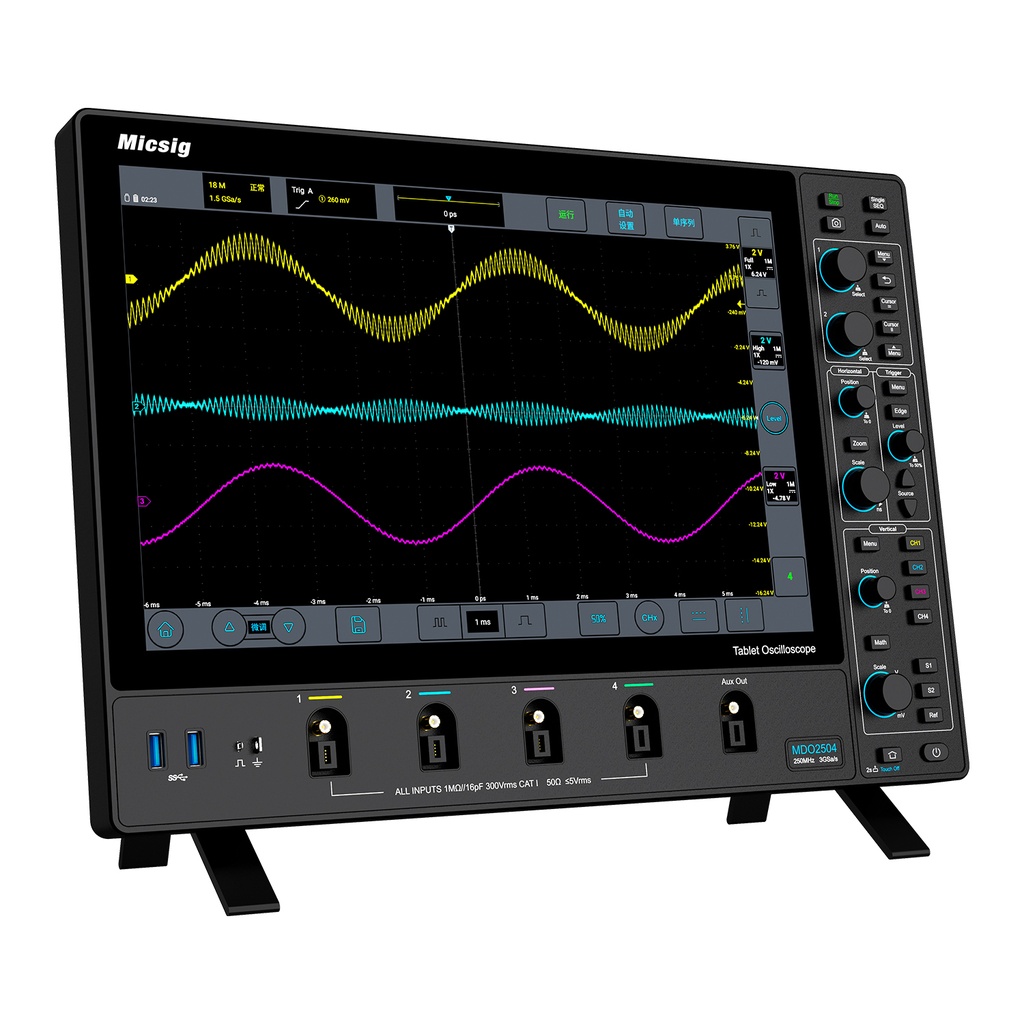
You can spec a digital oscilloscope down to the last picosecond, but if the company behind it won’t answer your questions or publish honest firmware updates, that spec sheet means little. Engineers who spend their days debugging mixed-signal designs know the vendor choice often matters more than the headline bandwidth. This guide walks through what to check before you commit—support depth, probe ecosystem, upgrade paths, and real-world reliability. One name that keeps coming up in those conversations is TPS, a supplier that treats support and documentation as core specs rather than afterthoughts.
Why Two Engineers Disagree on the Same Oscilloscope Spec Sheet
Put two experienced engineers in front of the same oscilloscope datasheet and you might expect identical conclusions. Instead, one sees a tool perfectly suited for high-speed serial debug; the other dismisses it as too noisy for sensitive analog work. The divergence rarely stems from a misread number. It comes from the unspoken assumptions each engineer brings to the table: signal type, probe loading, measurement bandwidth, and what “good enough” actually means for their particular bench.
A classic sticking point is the bandwidth specification. One engineer reads “1 GHz” as a hard guarantee that the scope will faithfully capture a 1 GHz square wave. The other knows that a 1 GHz Gaussian response already attenuates the third harmonic significantly, making edges look slower than expected. That same pair will then disagree about rise time, because the spec sheet’s calculated value assumes a clean, single-pole response. In practice, the scope’s front-end filtering, probe inductance, and ground lead length introduce errors the datasheet never mentions.
Even noise and ADC bits can lead to opposite verdicts. One engineer focuses on the 8-bit vertical resolution and calls the scope insufficient for power rail ripple. The other points out that with high-resolution acquisition mode and enough sample averaging, the effective number of bits can improve by two or more. Neither is wrong; they are simply reading the same page through different workflow lenses. The spec sheet remains unchanged, but the design problem, measurement setup, and personal history with past instruments all shape which line items get highlighted and which get ignored.
Bandwidth Numbers That Look Great Until Your Signal Falls Apart
An internet plan can boast 500 Mbps on paper, but the moment your device loses line-of-sight to the router, those numbers become decorative. Walls, microwave interference, and even a neighbor's Wi-Fi can chop real throughput down to a fraction of the advertised rate. The issue isn't capacity; it's how quickly the signal degrades under real-world conditions.
Think of raw bandwidth like a speed limit on a highway. A sign may say 100 miles per hour, yet potholes, sharp curves, and merging traffic keep you hovering around 40. Network congestion, packet loss, and retransmissions act the same way. Your connection might download a large file fine, but a video call stutters because momentary drops force data to be resent over and over.
What matters more than headline figures is how well the signal holds up when conditions get messy. Checking received signal strength, noise levels, and packet loss tells you more than a speed test run at 3 a.m. next to the router. A robust connection should feel consistent, not just fast in ideal moments.
The Trigger Modes That Separate a Debugging Tool from a Paperweight
A breakpoint that only fires on a specific line is fine for a first pass, but it won't rescue you when a heap corruption shows up three thousand cycles after the actual write. That is where trigger modes earn their place. Being able to arm the debugger on a data write to an address, then qualify it with a task ID or a peripheral state, turns what would be a three-hour bisect into a single run.
Hardware tools often expose a small set of built-in triggers: address match, data match, and maybe an instruction count. The difference between a tool you actually keep on your desk and one that ends up in a drawer is whether those triggers can be combined. A sequence like "watch this buffer, trigger only after the DMA controller reads the length field, and then snapshot the trace" is the kind of chaining that makes the hardware feel less like a passive monitor and more like a logic analyzer tuned to your bug.
Paperweights do not react to anything. A debugging tool without selectable trigger modes is not far from that. It may light up and connect to your IDE, but if it cannot filter out the noise of a running system, you are still guessing. The moment a trigger condition can be tied to a real event—a register value, a bus transaction, a timestamp window—the tool stops being a display stand and starts being the reason you find the bug before lunch.
Probe Quality Is Where Cheap Oscilloscopes Hide Their True Cost
Most buyers fixate on bandwidth and sample rate when comparing oscilloscopes, but the probes bundled with budget units often undo those headline specs before you even connect a signal. A 100 MHz scope paired with a poorly compensated 60 MHz probe won't just roll off high frequencies; it can introduce ringing, capacitive loading that distorts your circuit under test, and ground lead inductance that turns fast edges into misleading overshoot. The probe is not an afterthought—it's half the measurement system, and cheap models tend to hide their compromises there.
Compensation range is another tell. Quality probes offer a wide trimmer range to match different input capacitances, while low-cost probes may barely cover the scope's own input, leaving you with a peaked or sagging square wave that you're told to ignore. Shielding matters as well: thin, poorly terminated cables pick up switching noise from nearby supplies or digital buses, and before long you're chasing ghosts that aren't in your circuit. Replacing a set of probes can cost as much as the scope itself, which reveals where the manufacturer actually saved money.
There's also a practical limit to how much abuse cheap probes tolerate. The flimsy plastic hooks snap, ground clips lose spring tension, and the cable jacket cracks near the strain relief after a few months of bench use. You end up buying replacements or, worse, adapting your measurements to work around a probe that doesn't stay connected. In a professional setting, that downtime and those misleading traces cost far more than the initial price gap between a budget scope and a mid-range one.
Waveform Update Rate: The Spec Nobody Puts in the Brochure
Most spec sheets stop at bandwidth, sample rate, and memory depth. Waveform update rate rarely makes the cut, and that omission hides one of the biggest practical differences between scopes. When the display only refreshes a few hundred times per second, the dead time between captures can span orders of magnitude longer than the actual acquisition. A rogue pulse or intermittent fault simply falls through the gap.
That's why two instruments with identical bandwidth and sample rate can behave like different machines on the bench. A scope with a high waveform update rate keeps redrawing the trace tens of thousands or even millions of times per second, catching glitches that a slower unit would never expose. It's not about raw bandwidth; it's about how often the instrument looks at the signal. The brochure leaves it out because the number is easy to misread and hard to market without a demo, but for debugging real hardware, this spec often matters more than another gigahertz of headroom.
Firmware Updates and Support: Buying a Company, Not Just a Box
When you hand over cash for a new device, the spec sheet might look great today, but what happens six months down the road? Firmware updates are the quiet lifeblood of hardware—they patch security holes, fix bugs that only appear after real-world use, and occasionally unlock features the original design never promised. A company that treats firmware as an afterthought will leave you with a box that slowly rots, while the manufacturer chases the next product cycle.
Support is equally telling. The best vendors don't vanish after the sale; they maintain active forums, publish detailed changelogs, and actually answer emails when something goes sideways. You're not just buying a circuit board and some plastic—you're buying into a relationship with the people who built it. Do they respond to user feedback? Do they release fixes when a vulnerability surfaces, or do they tell you to upgrade to a newer model? These behaviors reveal whether you've bought a tool or a paperweight.
Before committing, spend ten minutes digging through the manufacturer's update history. Look at how long older products received patches, whether the support page reads like a ghost town, and if the community has moved on or stuck around. A cheap box with exceptional ongoing support will outlast a premium gadget that gets abandoned the moment the next version ships. That's the difference between buying a company and just buying a box.
FAQ
Look beyond the datasheet. A solid vendor documents probe compensation limits, publishes firmware changelogs with actual bug fixes, and lets you test the UI before committing. Mediocre ones hide trigger jitter specs and bury support behind ticket queues that take days.
A rule of thumb is 5 times the fastest clock or edge rate you expect to probe. For SPI, UART, and basic power rails, 100 MHz often feels cramped once you chase ringing or overshoot. If you touch DDR, USB 2.0, or fast switching regulators, start at 200 MHz and leave headroom for probes.
Yes, but only up to a point. You need at least 2.5 to 5 samples per cycle at the -3 dB bandwidth to reconstruct edges without interpolation artifacts. Beyond that, memory depth and waveform update rate affect daily debugging more than an extra gigasample.
Probe ecosystem cost. A cheap mainframe becomes expensive when each active differential probe costs more than the scope. Check whether the company offers affordable passive probes with sufficient bandwidth, and whether their probe interface is proprietary or standard.
They can be, if you accept the tradeoffs. USB scopes offer great portability and lower up-front cost, but you depend on a host computer, the UI may lag under heavy load, and isolation can be questionable. For field diagnostics or low-speed analog, they shine. For daily bench debugging, a dedicated benchtop unit is faster and more reliable.
Check the age of the latest firmware release for the model you want. Look at how far back they support older units. Ask for a calibration cost and turnaround time quote. If a company cannot tell you how long they will repair a discontinued model, that tells you their support horizon.
Deep memory with segmented capture, hardware-accelerated search and decode for common serial buses, and a responsive trigger system. Features like built-in waveform generator or protocol analysis often duplicate tools you already own. Focus on capture and search speed, not marketing bullet points.
Underestimating probes, ignoring used or refurbished options from the manufacturer, and paying for bandwidth they will never need because a sales rep upsold. Also, skipping hands-on trials. Always spend a few hours driving the interface with your own signals before committing.
Conclusion
An engineer picking a digital oscilloscope often gets burned by trusting only the headline numbers, and this guide exists to prevent that. Two colleagues can stare at the same spec sheet and reach opposite conclusions because one prioritizes bandwidth while the other worries about real-world signal integrity. Raw bandwidth figures rarely survive contact with a fast edge or a noisy ground plane. Trigger modes are where an instrument proves its worth: if it cannot isolate a runt pulse or a rare glitch, it might as well be a display for a waveform you already trust. Probes quietly decide whether your measurements are honest, and cheap probes add hidden capacitance, poor grounding, and misleading attenuation that no amount of software correction can fix.
Waveform update rate is the spec brochures conveniently skip, yet it dictates how quickly a scope catches infrequent faults. A sluggish update means you will miss a dropout that happens once in a million cycles. Beyond hardware, firmware updates and vendor support turn a purchase into a long-term relationship. A company that ships a box and forgets it leaves you stranded when a new protocol or a subtle bug appears. The practical buying guide argues that an oscilloscope is not just a collection of numbers; it is a debugging partner whose trigger logic, probe quality, update speed, and support team all have to earn your trust. Ignore any one of these, and the best bandwidth on paper becomes an expensive way to document failures you cannot explain.
Contact Us
Contact Person: Lily
Email: [email protected]
Tel/WhatsApp: +49 (0) 2161 49526-0
Website: https://tps-elektronik.com/en/